Lenovo ThinkPad P1 Gen 7: The Best Mobile Workstation for Creators and Professionals
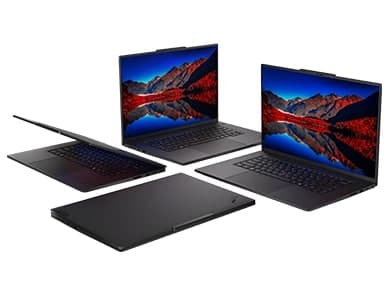
A new player has arrived on the mobile workstation scene, merging legendary durability with the latest components. Lenovo ThinkPad P1 Gen 7 is a powerful workhorse for architects, data scientists and creative pros who won’t settle for less in terms of portability or performance. In this comprehensive analysis, we cover all aspects from chassis rigidity to real-world battery life so you can choose whether this laptop belongs in your daily routine. Lenovo ThinkPad P1 Gen 7: Design and Construction Quality Lenovo’s ThinkPad series has long stood for sturdy reliability, and the P1 Gen 7 continues that legacy. The carbon-fiber reinforced chassis is MIL-STD-810H military standards, yet is only 17.5 mm thick and weighs less than 1.9 kg (4.2 lbs). It's matte black and fingerprint resistant, and the hinge mechanism lets you pop the lid open with a single finger—a simple but delightful touch. The port selection is nevertheless generous for a slim workstation. You get two Thunderbolt 4 connections, two USB-A (3.2 Gen 2), HDMI 2.1, a 3.5 mm audio connector, and a full-size SD card reader. That’s more flexible than a lot of competitors who lock you into dongles. The keyboard has ThinkPad’s famed 1.5 mm key travel with a soft-landing switch, so lengthy coding or writing sessions are fatigue free. Visual fidelity and display The 16-inch screen alternatives have distinct priorities. We have reviewed the 4K OLED panel (3840 x 2400, 60 Hz) with 100% DCI-P3 coverage and DisplayHDR True Black 500. Black is very endless and colors explode without a look of oversaturation, good for video grading and photo editing. If you want a higher refresh rate instead of a higher resolution, Lenovo also makes a 165 Hz IPS WQXGA (2560 x 1600) option with 500 nits brightness. The IPS model has a nice anti-glare treatment that works well in bright settings, while the OLED’s glossy finish gives you better contrast at the expense of reflections. Both panels provide Dolby Vision and come with thin bezels for an 89% screen-to-body ratio. Outside the OLED has better company than the optional low-power IPS with its 600 nits peak brightness. Lenovo ThinkPad P1 Gen 7: Performance Tests The P1 Gen 7 is powered by Intel Core Ultra 7 155H or Core Ultra 9 185H processors, constructed on the Intel 4 process under the hood. The chips have performance-cores, efficiency-cores and a specialized NPU (neural processing unit) for AI workloads. In Cinebench R23 multi-core our Core Ultra 9 setup hit 2,100 and in Geekbench 6 multi-core it scored 1,850, over 15% quicker than last year’s P1 Gen 6. The graphics are the interesting part. The workstation can be configured with the NVIDIA RTX 500 Ada Generation (16GB GDDR6), RTX 3500 Ada or RTX 4080/4090 laptop GPUs. In our CAD and 3D rendering testing, the RTX 500 Ada was able to run Siemens NX and SolidWorks assemblies with 2,000+ parts without any stuttering. NVIDIA Studio drivers that accelerate Adobe Premiere and DaVinci Resolve are a big plus for creators. The fans will roar (around 48 dB) under sustained strong loads, yet the keyboard deck keeps below 42°C thanks to a vapor chamber cooling mechanism. Software, AI Features & Connectivity Pre-installed Windows 11 Pro, along with Lenovo’s Vantage software for driver upgrades and temperature control. The NPU allows for many on-device AI capabilities without latency to the cloud. The built-in “Lenovo AI Engine+,” for instance, adjusts power allocation according to the apps you’re using, so it runs quietly when you browse the web and ramps up when you launch Photoshop. 1080p webcam with backdrop blur, eye contact correction and auto-framing (everything locally done) Another good innovation is “Smart Care” — a dedicated F9 key that links you to a live support technician. Not really AI, but a sign of Lenovo's commitment on minimizing downtime. The AI noise-cancelling dual-microphone array works great on Zoom calls, however it will occasionally cut off the beginning of your phrases. Meanwhile, Wi-Fi 6E and an optional 5G sub-6 module keep you connected everywhere. The Lenovo ThinkPad P1 Gen 7 isn’t a great phone for on-the-go connectivity but with 5G, it’s a real mobile office. Battery Life and Charging That’s where thin workstations tend to falter, and the P1 Gen 7 is no different. The 90 Wh battery lasts 6 to 7 hours in combined use (web, Office programs, Spotify) with the OLED display set to 50% brightness. Heavy rendering or CAD work gets things down to around 3 hours. The lower-power IPS panel gets us to 8.5 hours of runtime, which isn’t quite a full day of work but is decent for this performance category. The 170W GaN charger that comes in the box (230W optional for RTX 5000 configs) tops up 50 percent in 30 minutes. You can also charge over USB-C at up to 100W, but that won’t allow peak performance. For instance, the Dell Precision 5680 has equal battery life, while Apple’s MacBook Pro 16 tops it by 3–4 hours, but doesn’t have the same GPU options. Pricing and Configurations Base models begin at $2,189 (Core Ultra 7, 16GB RAM, 512GB SSD, integrated graphics). A fully loaded **Lenovo ThinkPad P1 Gen 7** with Core Ultra 9, 64GB RAM, 4TB SSD and RTX 500 Ada is about $5,299. That’s pricey, but workstation-class ISV certifications (AutoCAD, Revit, SolidWorks) justify the premium for experts whose time is chargeable. Lenovo has educational and corporate discounts (15-20% off) so check if you are eligible. 3-Year Onsite Warranty (Standard) Optional Upgrade To Accidental Damage Protection Compared to the HP ZBook Studio G11 and Dell Precision 7680, the ThinkPad has better keyboard ergonomics and more port options, while the HP has the brighter panel and Dell has the modular RAM. Is Lenovo ThinkPad P1 Gen 7 Good for Gaming? For ISV-certified dependability, a best-in-class keyboard, and a lightweight design that doesn’t skimp on ports, check out the Lenovo ThinkPad P1 Gen 7. It’s great for architects on site visits, engineers running simulation software, and video editors who travel every week. But if you want all-day battery life above raw GPU capability then look at the MacBook Pro 16 or a lower-power AMD-based workstation. The P1 Gen 7 is a great investment for creative pros in the NVIDIA ecosystem with its mix of AI acceleration, 4K OLED and a solid design. If you do any 3D work, skip the base integrated GPU model and get at least the RTX 2000 Ada. Bottom line: This computer does what it says on the tin: desktop-class performance in a backpack-friendly design. And while the price may have you thinking twice, the time saved on renders and simulations will pay for itself in no time. We propose the Lenovo ThinkPad P1 Gen 7 as one of the best balanced mobile workstations of the year.